Customers Overview
The Customers section is your built-in CRM. It brings every contact who has messaged you or placed an order into a single, searchable list, with engagement metrics, lifecycle segments, tags, and cross-channel identities all in one place.
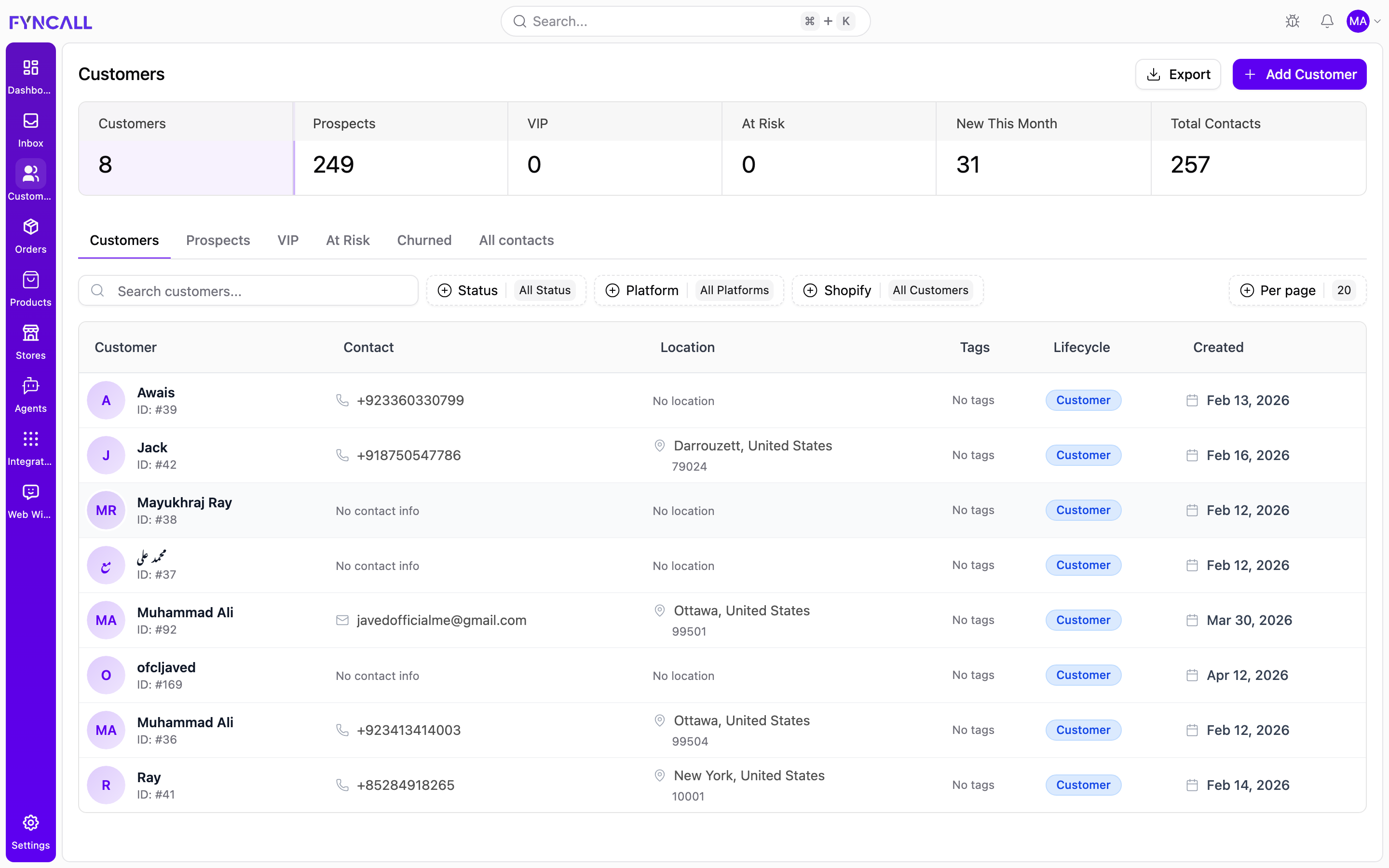
In the example above, the summary cards show 8 Customers, 249 Prospects,
and 257 Total Contacts, and the list below shows each contact with their
avatar and ID (for example Awais, ID: #39), phone or email, location,
tags, a Customer lifecycle badge, and the date they were created.
Who appears here
A contact is added automatically the first time they reach you on any connected channel (WhatsApp, web widget, Instagram, email) or when they are synced from a connected Shopify store. You can also add contacts manually.
Fyncall distinguishes between two broad groups:
| Group | Meaning |
|---|---|
| Customer | Has placed at least one order. A Shopify contact is treated as a customer. |
| Prospect | Has messaged you on a unified-inbox channel but has not placed an order yet. |
By default the list focuses on customers (people who have ordered) so it stays uncluttered. Use the segment tabs to bring prospects and other groups into view.
Summary cards (KPIs)
A row of cards across the top of the page summarizes your contact base. Each card is also a shortcut: selecting one filters the list to that group.
| Card | What it counts |
|---|---|
| Customers | Contacts who have placed at least one order |
| Prospects | Contacts who have messaged but never ordered |
| VIP | High-value customers |
| At Risk | Customers with declining or stalled activity |
| New This Month | Contacts created in the current calendar month |
| Total Contacts | Every contact, including prospects |
A Blocked count and a Churned segment are also tracked. Blocked contacts are people you have stopped accepting messages from, independent of their lifecycle stage.
Segment tabs
Below the cards, tabs let you switch the list between lifecycle segments:
| Tab | Shows |
|---|---|
| Customers | Everyone who has placed at least one order (default view) |
| Prospects | Messaged you but have not ordered yet |
| VIP | High-value customers |
| At Risk | No order in the last 90–180 days |
| Churned | Silent for 180+ days |
| All contacts | Every contact regardless of lifecycle |
Searching
Use the Search customers… box to find a contact by name, email, or phone number. Results update as you type and respect any segment tab or filters you have applied.
Filtering
Three filter menus sit next to the search box:
| Filter | Options | Effect |
|---|---|---|
| Status | All Status / Active / Inactive / Blocked | Filter by account status |
| Platform | All Platforms / WhatsApp / Instagram / Web Chat / Telegram / Email | Filter by the channel the contact uses |
| Shopify | All Customers / Shopify Synced / Not Synced | Filter by whether the contact is linked to a Shopify customer record |
When any of these filters is active, a Reset button appears — select it to clear all filters at once. You can also set each menu back to its "All" option or switch to a broader segment tab.
The search term, filters, segment, page, and page size are all stored in the page URL. You can bookmark or share a filtered view and it will reopen exactly as you left it.
The customer list
Each row summarizes one contact:
| Column | Description |
|---|---|
| Customer | Avatar (initials), name, and internal contact ID (for example, ID: #1) |
| Contact | Email address and phone number |
| Location | City / country, or "No location" if unknown |
| Tags | Tags applied to the contact, or "No tags" |
| Lifecycle | The contact's lifecycle badge (Customer, VIP, At Risk, and so on) |
| Created | The date the contact record was created |
Select any row to open that contact's profile.
Lifecycle states
The Lifecycle badge classifies where a contact sits in their journey with you:
| State | Meaning |
|---|---|
| Prospect | Has messaged but placed no order yet |
| Customer | Has placed at least one order |
| Active | Ordered recently (within roughly the last 90 days) |
| At Risk | Has ordered before but no order in roughly the last 90–180 days |
| Churned | Silent for 180+ days |
| VIP | High-value customer |
Analytics and Insights
An expandable Analytics & Insights panel ("Detailed customer analytics and trends") surfaces four breakdowns of your contact base:
| Card | Shows |
|---|---|
| Customer Timeline | Growth over time — new customers, active customers, and message volume per period |
| Platform Distribution | Customers split by channel (WhatsApp, Instagram, Email, Web Chat, Telegram) |
| Top Customer Tags | The most frequently used tags |
| Geographic Distribution | Customers by country |
Pagination
Use the Per page control (default 20; options 10 / 20 / 50 / 100) to change how many contacts are shown at once, and the page navigation below the list to move through results.
Adding a customer
Select + Add Customer in the top-right corner to open the create form. You only need a name plus either an email or a phone number. See Managing Customers for the full walkthrough.
Exporting
Download your full customer base as an Excel file (customers.xlsx) that includes the contact and engagement data held for each customer.
To export your customers:
- Select Export in the top-right corner.
- Wait while the button shows an "Exporting…" state and the file is prepared.
- When it confirms "Customers exported successfully," your browser downloads
customers.xlsx.
Customers connected to Shopify stay in sync automatically. Contacts you create or edit in Fyncall are pushed to the connected Shopify store, and changes made in Shopify are pulled back into Fyncall.
Related pages
- Customer Profiles — the detail page for a single contact
- Managing Customers — creating, editing, blocking, tagging, and notes