Integrations Overview
The Integrations page is your catalog of channels and services you can connect to Fyncall. Browse what's available, search by name, and connect the channels you need to unlock messaging and automation. This page is the hub — each integration links out to a full, step-by-step setup guide with the exact credentials you'll need.
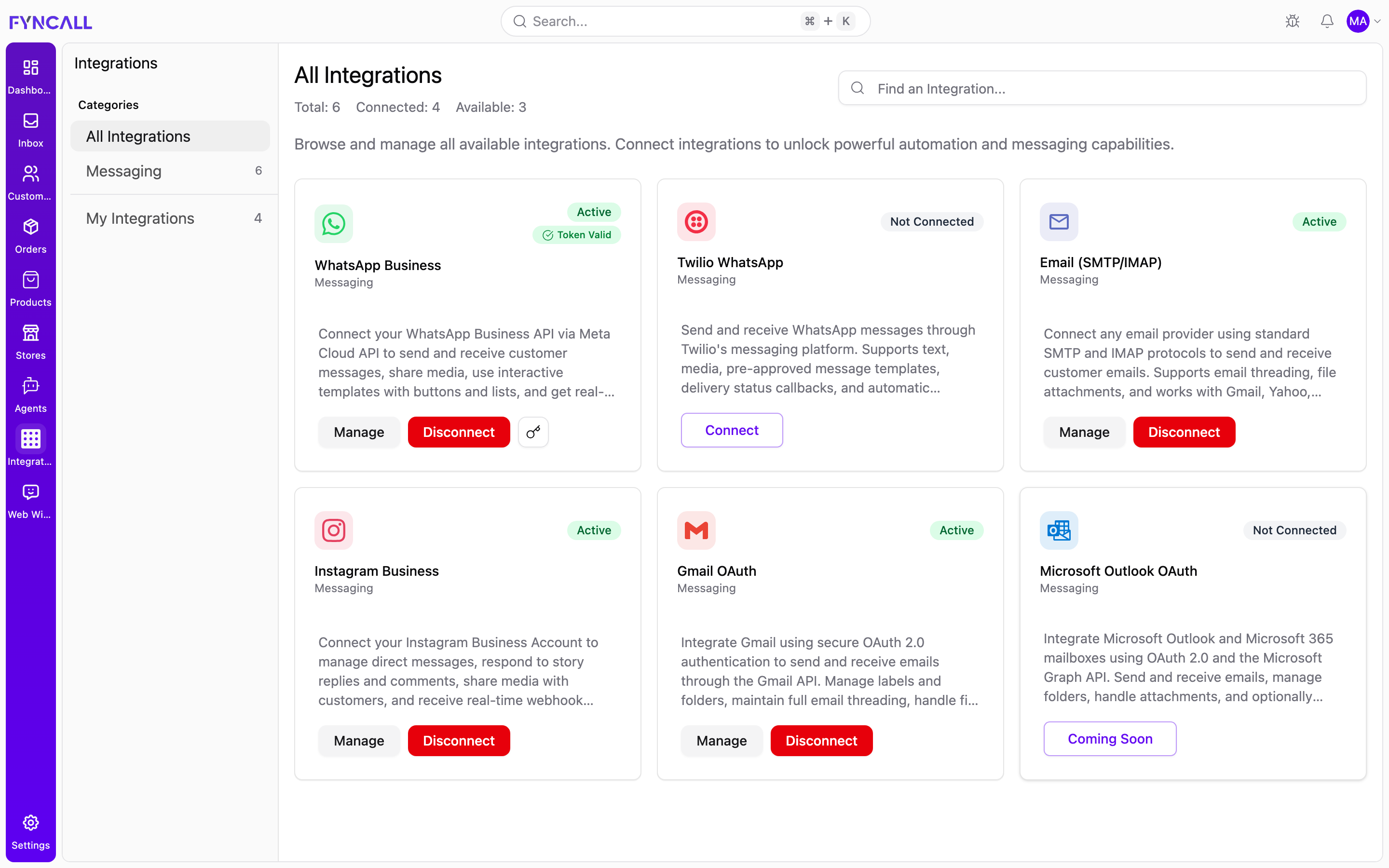
Open Integrations from the main navigation. Shopify and other commerce stores are managed under the separate Stores menu, not on this page — see Shopify.
The Catalog UI
Categories Sidebar
The left sidebar lets you filter the catalog:
| Item | What it shows |
|---|---|
| All Integrations | Every integration in the catalog |
| Messaging | Messaging-channel integrations (the count appears next to the label) |
| My Integrations | Only the integrations your workspace has activated |
Categories are generated from the catalog, so the list always reflects whatever integration types are currently available.
Search
Use the Find an integration… search box at the top right to filter cards by name as you type.
Status Counts
The header shows live counts for the current view:
- Total — number of integrations in the catalog
- Connected — how many you have connected
- Available — how many are currently connectable
Card States
Each integration is shown as a card with a status badge and an action button:
| Card state | Badge | Action button | Meaning |
|---|---|---|---|
| Not Connected | Not Connected | Connect | Available to set up now |
| Coming Soon | Not Connected | Coming Soon (disabled) | In the catalog but not yet available to connect |
| Connected | Connected | Manage / Disconnect | Already set up and active |
A connected integration with a problem shows an Error – Needs Attention badge and a Fix Issues button instead of Manage.
Availability
All integrations currently in the catalog are messaging channels. On production, the channels you can connect today are:
| Integration | Category | Availability |
|---|---|---|
| WhatsApp Business (Meta Cloud API) | Messaging | Available — Connect |
| Twilio WhatsApp | Messaging | Available — Connect |
| Email (SMTP/IMAP) | Messaging | Available — Connect |
| Instagram Business | Messaging | Coming Soon |
| Gmail (OAuth) | Messaging | Coming Soon |
| Microsoft Outlook (OAuth) | Messaging | Coming Soon |
WhatsApp (Meta Cloud API), Twilio WhatsApp, and Email via SMTP/IMAP are the primary live integrations. Gmail OAuth, Outlook OAuth, and Instagram Business may appear as Coming Soon on production. To connect Gmail or Outlook today, use the Email (SMTP/IMAP) integration with an app password — see Custom Email (SMTP/IMAP).
Commerce platforms such as Shopify are not listed here. Connect and manage your store from the Stores menu instead — see Shopify.
What You Need to Connect Each Integration
Gather these prerequisites before clicking Connect. Each row links to the full setup guide.
| Integration | What you need | Full guide |
|---|---|---|
| WhatsApp Business (Meta Cloud API) | Meta Developer app (App ID + App Secret), a WhatsApp Business Account (WABA ID), a dedicated WhatsApp phone number (E.164), the Phone Number ID, and a permanent access token (EAA…). Fyncall provides the webhook callback URL and verify token to paste into Meta. | Meta WhatsApp Setup |
| Twilio WhatsApp | A Twilio account with Account SID (AC…, 34 chars) and Auth Token (32 chars), a WhatsApp-enabled Twilio sender number (E.164), and optionally a Messaging Service SID (MG…). Set Twilio's webhook to the Fyncall callback URL. | Twilio WhatsApp Setup |
| Email (SMTP/IMAP) | An email account plus SMTP host/port, IMAP host/port, the username (email address), the password or app password, and SSL/TLS settings. Presets are built in for Gmail, Outlook/Microsoft 365, Yahoo, iCloud, Zoho, and more; choose Custom for any other provider. | Custom Email (SMTP/IMAP) |
| Instagram Business (Coming Soon) | An Instagram Business or Creator account (not Personal) with admin access, a Facebook Page linked to that account, and a Meta app with Instagram messaging permissions. | Instagram Setup |
| Gmail (OAuth) (Coming Soon) | A Google/Gmail account, Gmail OAuth configured by an administrator, and email permissions granted during the OAuth consent flow. Until live, connect Gmail via SMTP/IMAP. | Gmail Setup |
| Microsoft Outlook (OAuth) (Coming Soon) | A Microsoft 365 / Outlook.com account, Microsoft OAuth configured by an administrator, and Graph email permissions granted during consent. Until live, connect Outlook via SMTP/IMAP. | Outlook Setup |
Connecting an Integration
- Open Integrations.
- Find the integration you want (use the sidebar or search).
- Click Connect on its card.
- Follow the setup steps for that provider — enter credentials, complete OAuth, or paste the webhook details shown on screen.
- The card moves to My Integrations and shows a Connected badge.
If a card shows Coming Soon, the button is disabled — that integration is not yet available to connect.
Managing an Integration
Once connected, open the integration card to:
| Action | Description |
|---|---|
| Manage | Open the integration's settings and details |
| Fix Issues | Resolve a connection or token problem (shown when an error is detected) |
| Disconnect | Remove the integration from your workspace |
Some providers (for example WhatsApp Business) also surface a token status indicator so you can tell at a glance whether the access token is valid, expired, or not yet validated.
Troubleshooting
Integration Shows an Error
- Open the card and click Fix Issues.
- Re-enter or re-authorize the credentials.
- Confirm the status returns to Connected.
Token Expired
For token-based channels (such as WhatsApp Business), the card flags an expired token. Update the access token from the card to restore the connection.
Integration Not Listed
Only integrations currently in the catalog appear. If something you expect is missing, it may be a Coming Soon item or managed elsewhere (for example, Shopify under Stores).