Agent Flows (Workflows)
A flow (also called a workflow) is a reusable instruction that tells one of your AI agents exactly how to handle a specific situation — for example, replying to a story, answering "where is my order?", or greeting a first-time visitor. You write the flow in plain language, and Fyncall's AI converts it into a structured, step-by-step workflow that runs automatically whenever its trigger is matched.
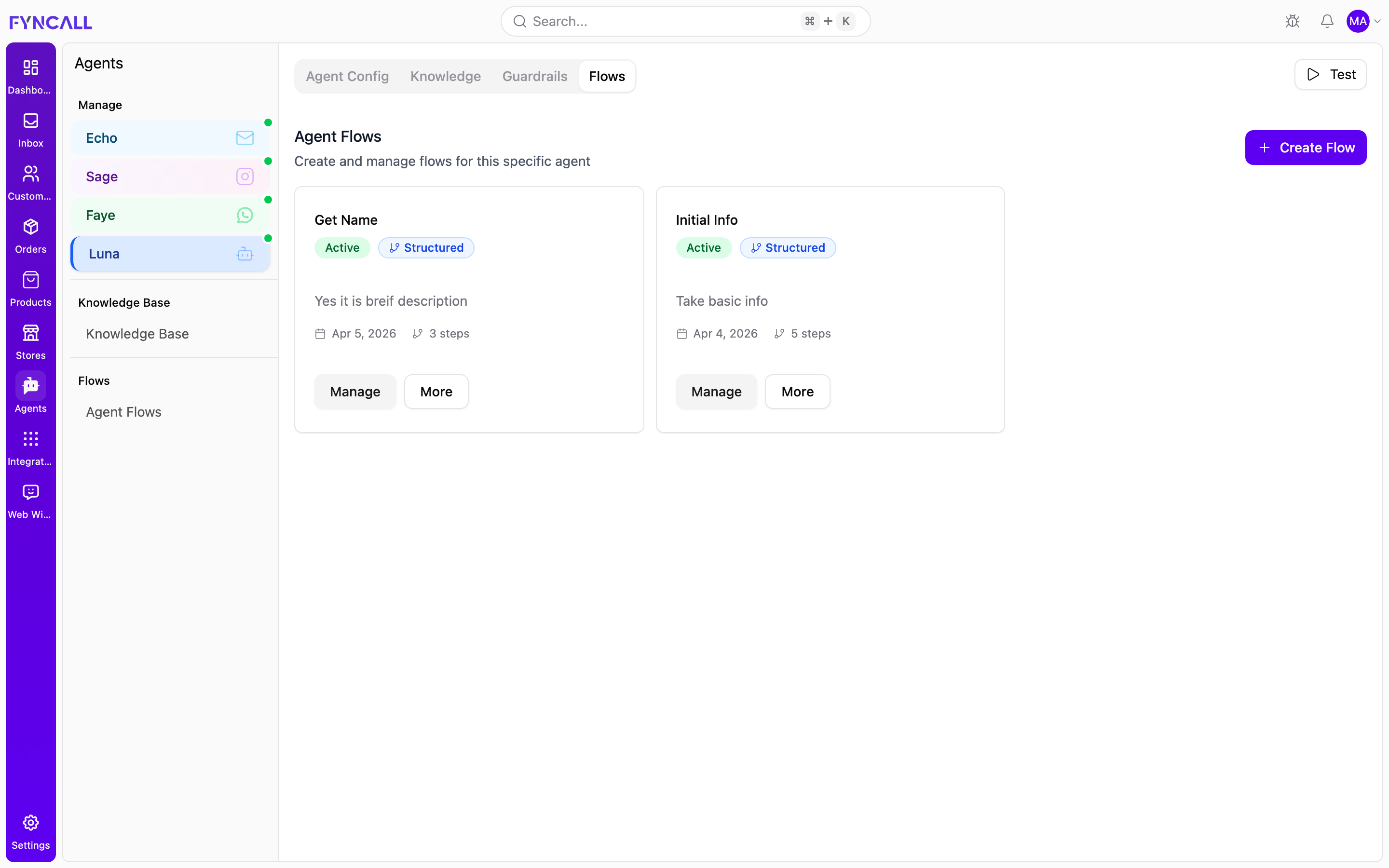
Flows are created and managed from the Flows tab of an individual agent.
How Flows Work
- You describe a scenario in natural language (the Flow Scenario).
- You choose what triggers the flow (a keyword, a predefined event, or an Instagram interaction).
- Fyncall's AI reads your description and converts it into structured steps — messages, questions, conditions, and tool calls.
- When a real conversation matches the trigger, the agent runs the flow.
Each flow belongs to a single agent. To automate the same scenario on more than one channel, create a separate flow on each agent.
Per-Channel Agents
Fyncall creates a dedicated agent for each connected channel. Every agent has its own Flows tab, and the available triggers differ by channel.
| Agent | Channel | Notes |
|---|---|---|
| Echo | Flows always use a custom (On Message Received) trigger. | |
| Sage | Supports special Instagram triggers (story replies, comments, mentions, DMs) and content targeting. | |
| Faye | Keyword / custom triggers. | |
| Luna | Web (chat widget) | Keyword / custom triggers. |
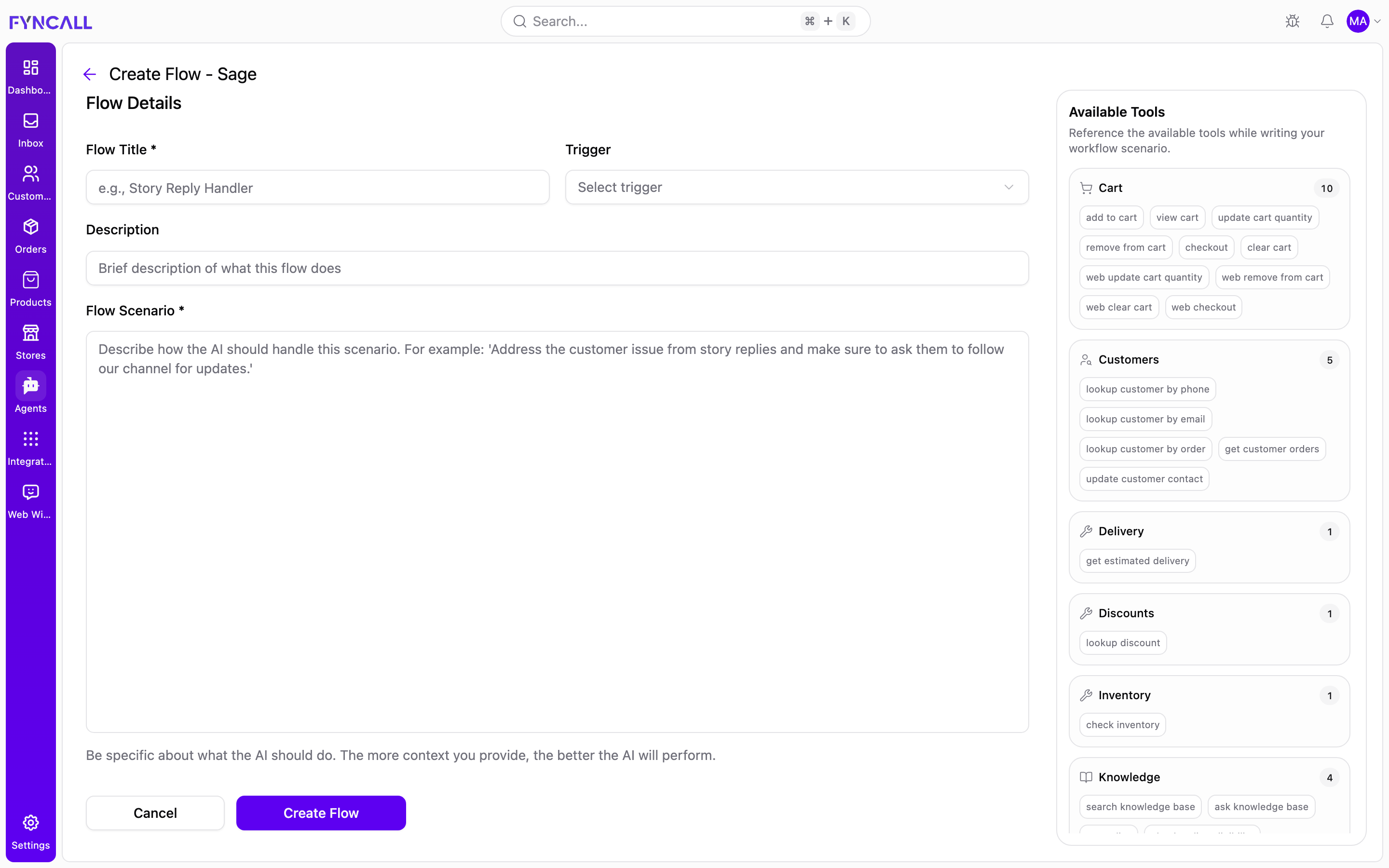
The agent you are editing is shown in the Manage list on the left of the Agents page, and the Create Flow screen header shows the agent name (for example, Create Flow - Sage).
Creating a Flow
Step-by-step
- Open the Agents page and select the agent you want to add a flow to (Echo, Sage, Faye, or Luna).
- Open the Flows tab.
- Click Create Flow (top right).
- Enter a Flow Title — a short, descriptive name (for example, Story Reply Handler or Order Status).
- Configure the Trigger (see Choosing a Trigger below). What you see here depends on the channel.
- (Optional) Add a Description — a brief note about what the flow does.
- Write the Flow Scenario — describe, in plain language, exactly how the AI should handle the situation. Reference the Available Tools panel on the right while you write.
- Click Create Flow.
- The flow is saved and Fyncall begins the AI conversion step. Watch the conversion badge move from Pending to Converting and finally to Structured when it is ready.
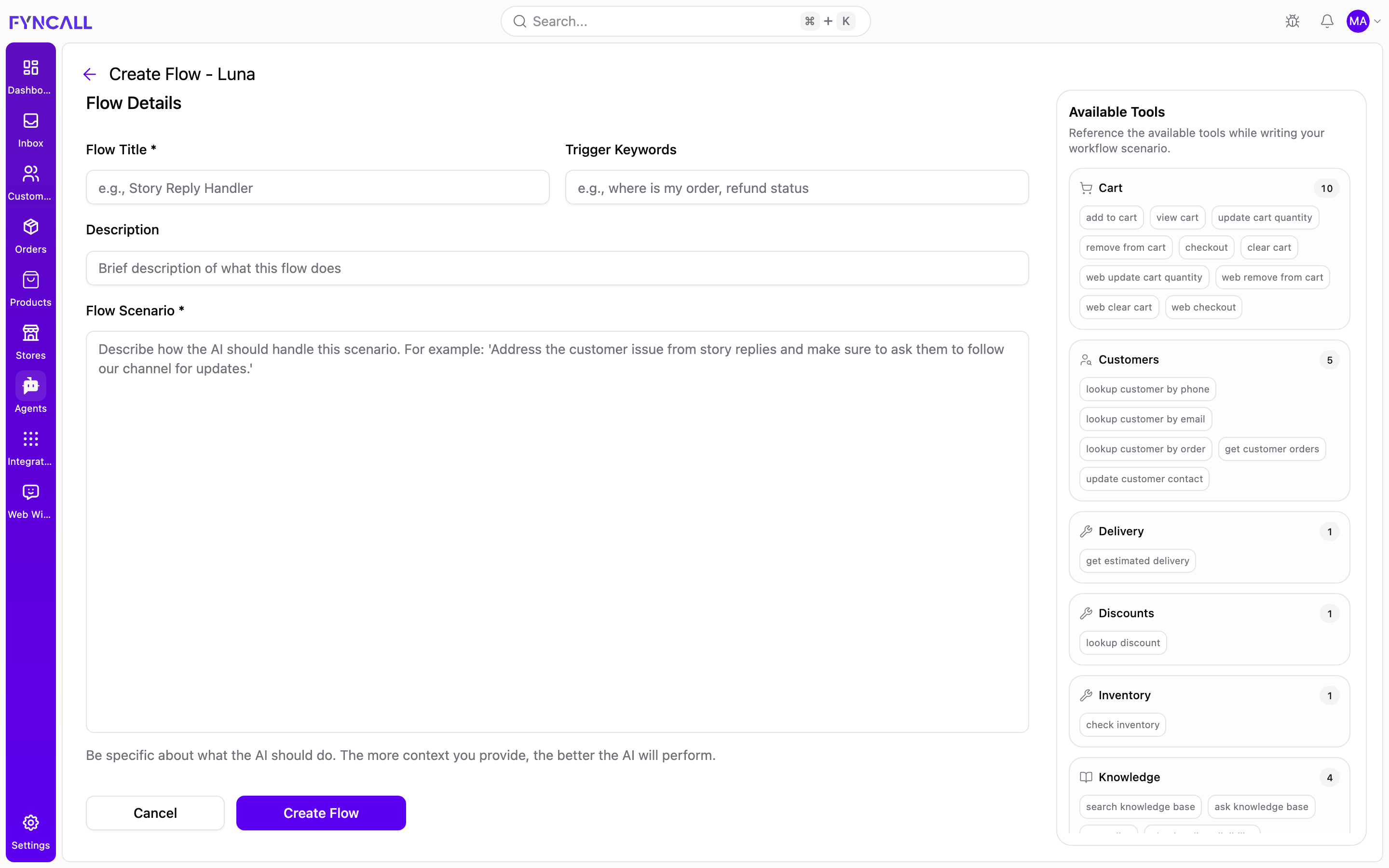
Be specific in the Flow Scenario. The more context you provide — the tone to use, the information to collect, and the expected outcome — the more accurate the generated workflow will be.
Choosing a Trigger
The trigger decides when a flow runs. The control shown on the Create Flow form depends on the channel:
| Trigger style | Where it appears | How to use it |
|---|---|---|
| Trigger Keywords | Web (Luna), WhatsApp (Faye) | Type one or more comma-separated phrases, e.g. where is my order, refund status. The flow runs when a customer message matches a keyword. |
| Predefined trigger | Agents that expose channel events | Pick an event from the Trigger dropdown. |
| On Message Received | All agents | A custom trigger that runs the flow based on the scenario itself rather than a fixed keyword. Email (Echo) flows always use this. |
| Instagram special triggers | Instagram (Sage) | Choose an Instagram interaction from the dropdown (see Instagram Workflows). |
Writing the Flow Scenario
The Flow Scenario is the heart of the flow. Write it the way you would brief a human agent. For example:
When a customer asks about returns, ask for their order number, look up the order, and check whether it is within the 30-day return window. If it is eligible, ask for the return reason and confirm the return. If it is not eligible, explain the policy and offer alternatives.
The AI uses your description, plus the tools the agent is allowed to use, to build the structured steps.
Available Tools
The Available Tools panel on the right lists every tool the agent can use, grouped by category with a count per group. Use it as a reference while writing your scenario — mention the actions you want the AI to take, and it will wire up the matching tools during conversion.
| Category | What it covers |
|---|---|
| Products | Search products, check details |
| Cart | Add to cart, view cart, checkout, and other cart operations |
| Customers | Look up a customer by phone, email, or order; get customer orders; update contact |
| Orders | Look up orders and order status |
| Order Modifications | Update shipping address, add order notes, cancel orders |
| Refunds | Refund eligibility and status |
| Delivery | Estimated delivery |
| Discounts | Look up discount codes |
| Inventory | Check stock availability |
| Knowledge | Search the knowledge base |
| Support | Create tickets and escalate |
The tools available depend on your connected store and integrations, so the catalog shown for each agent can vary. If no tools are available for a channel, the panel says so.
Instagram Workflows
Instagram (the Sage agent) supports special triggers that respond to specific Instagram interactions. On the Create Flow form, the Trigger dropdown lists these instead of keyword fields.
Instagram trigger types
| Trigger | Runs when… | Content targeting |
|---|---|---|
| On Story Reply | Someone replies to your Instagram story | Yes |
| On Story Mention | Someone mentions your account in their story | No |
| On Post Comment | Someone comments on your image or carousel post | Yes |
| On Reel Comment | Someone comments on your reel | Yes |
| On DM Received | Someone sends you a direct message | No (supports keyword matching) |
| On Message Received | Custom fallback trigger based on the scenario | No |
Content targeting
When a selected trigger supports targeting, a Content Target option appears:
- Choose All posts / All stories / All reels to apply the flow to every matching item, or
- Choose Specific post / Specific story / Specific reel to apply the flow to a single item.
- If you choose a specific item, pick it from the dropdown. Recent items are listed with a caption preview and engagement counts (likes and comments).
Available variables
When an Instagram trigger is selected, an Available Variables panel appears with clickable chips such as {customer_name}, {instagram_username}, {comment_text}, and {message_text}. Click a chip to insert it into the Flow Scenario, and the AI will fill in the real value at runtime.
Instagram flows respond by sending a DM. After choosing a trigger, a reminder shows how the AI will respond for that trigger.
Managing Flows
Each flow appears as a card on the Flows tab showing its title, status, AI conversion status, description, creation date, and step count.
Flow card controls
| Control | Action |
|---|---|
| Manage | Opens the flow's detail page. |
| More | Opens a menu with Edit, Pause / Activate, and Delete. |
| Edit & Resubmit | Shown only when AI conversion failed — reopens the flow to fix and re-convert it. |
The status badges on each card are:
| Badge | Meaning |
|---|---|
| Active / Inactive | Whether the flow is currently handling conversations. |
| Pending | Waiting to be converted by the AI. |
| Converting | The AI is converting the flow now. |
| Structured | Successfully converted and ready to run. |
| Failed | Conversion failed; edit and resubmit. |
The flow detail page
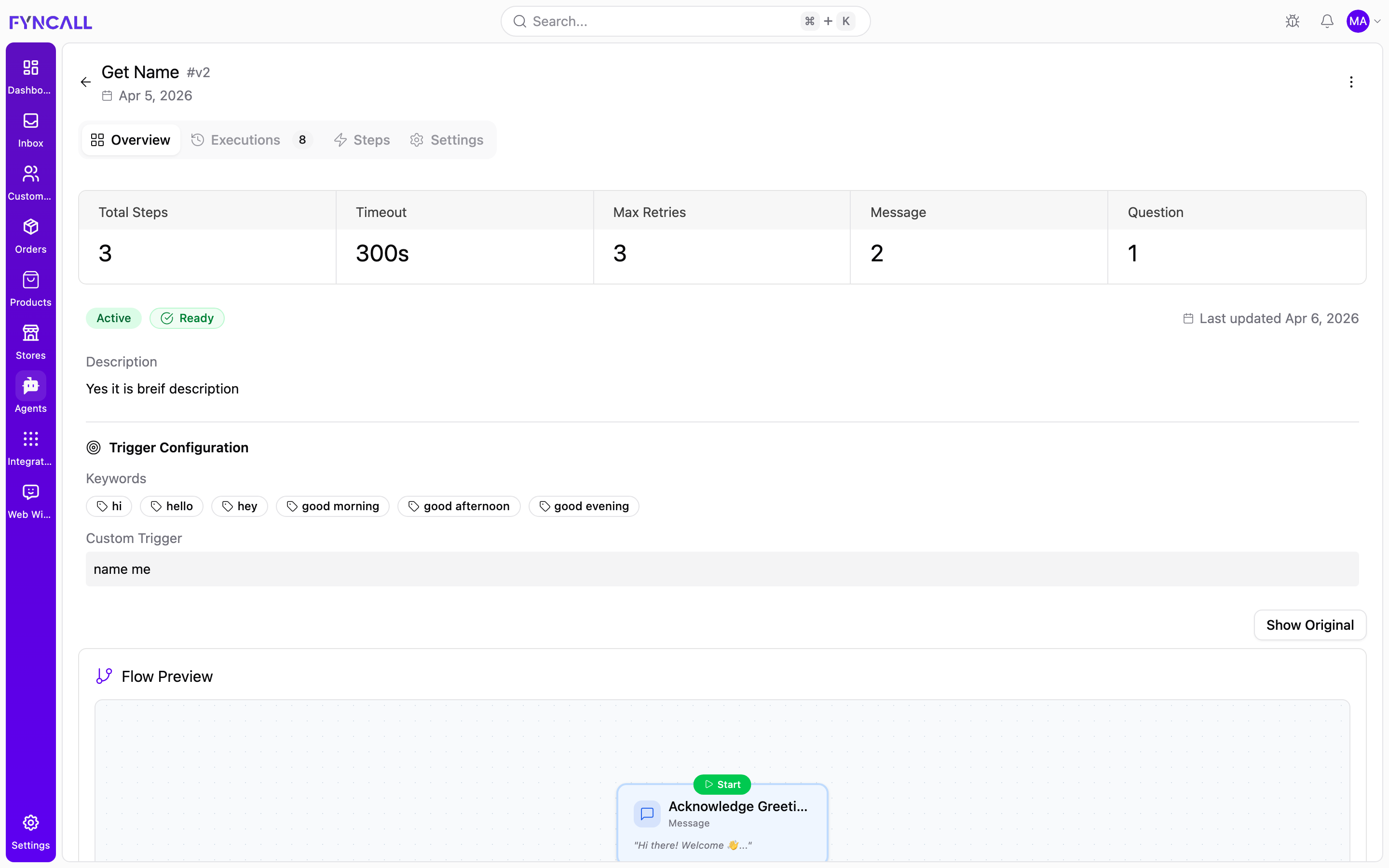
Click Manage to open a flow. The header shows the flow title, version (for example #v2), and creation date, plus a menu (top right) to Pause / Activate or Edit. Below the header are four tabs.
Overview tab
- Summary cards: Total Steps, Timeout, Max Retries, and a count per step type (Message, Question, Condition, Tool Call, and so on).
- The flow status (Active / Inactive) and conversion status (Ready), plus the description.
- Trigger Configuration — the Keywords chips and/or Custom Trigger text.
- Flow Preview — a visual flowchart of the generated steps. Use Show Original to switch to the original natural-language instructions, and Show Flowchart to switch back.
Executions tab
A history of every time the flow was triggered. A summary shows Completed, Failed, Active, and Total counts. Expand any execution to see its IDs, start time, last activity, current step, and what it is waiting for, and use View Conversation to jump to the related inbox conversation.
Steps tab
The full structured step timeline, plus the Original Rule Text that generated it.
Settings tab
- Trigger Configuration — keywords or custom trigger text.
- Execution Settings — Timeout, Expiry, Max Retries, and Allow Interruption.
- AI Conversion Status — the current conversion state. If it failed, use Edit & Resubmit or Retry to re-run conversion, and review the error message and suggestions.
- Workflow Information — workflow ID, version, created date, and last updated date.
Editing, activating, and re-converting
- Edit a flow — use Edit (from the card's More menu or the detail page menu). Saving an edited flow restarts the AI conversion automatically.
- Activate or pause — toggle the flow from the card's More menu or the detail page menu. Pausing stops the flow from handling new conversations without deleting it.
- Re-convert — if conversion fails, open the flow and use Edit & Resubmit to fix the scenario, or Retry to re-run conversion on the existing text.
- Delete — use Delete from the More menu. Deleting an active flow stops all automated responses for that scenario, so confirm before removing it.
Deleting a flow cannot be undone. If a flow is misbehaving, pause it instead of deleting it while you investigate.
Combine flows with your agent's personality, knowledge base, and guardrails. The personality sets the voice, the knowledge base supplies the facts, flows define repeatable procedures, and guardrails enforce the limits.