Ticket Preferences
Configure how tickets are assigned and transferred, set response-time goals, automate the ticket workflow, tune the AI Copilot, and control how the ticket inbox is displayed.
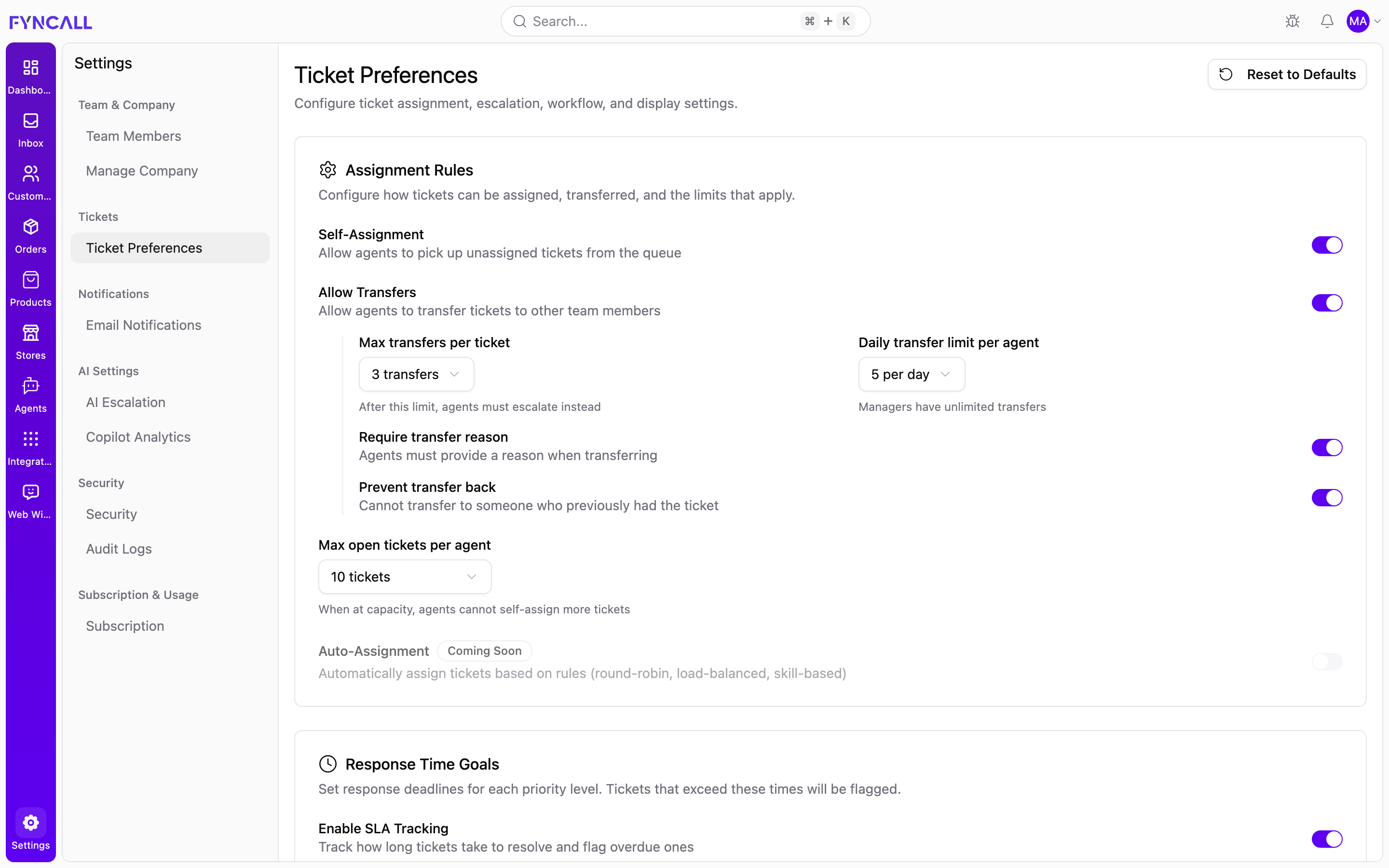
Ticket Preferences require admin access.
Open Settings → Ticket Preferences (/settings/ticket-preferences). The page is a set of cards, each with its own Save button that appears only when you change something in that section.
A Reset to Defaults button (top of the page) restores every preference to its default value after a confirmation prompt — this cannot be undone.
Assignment Rules
Controls how tickets are assigned, transferred, and the limits that apply.
| Setting | Type | Description |
|---|---|---|
| Self-Assignment | Toggle | Allow agents to pick up unassigned tickets from the queue |
| Allow Transfers | Toggle | Allow agents to transfer tickets to other team members |
| Max open tickets per agent | Dropdown | 5, 10, 15, 20, 25, 30, or 50. When at capacity, agents can't self-assign more |
| Auto-Assignment | Toggle | Coming Soon — automatic assignment (round-robin, load-balanced, skill-based). Currently disabled |
When Allow Transfers is on, extra options appear:
| Setting | Type | Description |
|---|---|---|
| Max transfers per ticket | Dropdown (1–5) | After this limit, agents must escalate instead |
| Daily transfer limit per agent | Dropdown (3, 5, 10, 15, 20) | Managers have unlimited transfers |
| Require transfer reason | Toggle | Agents must give a reason when transferring |
| Prevent transfer back | Toggle | Can't transfer to someone who previously had the ticket |
Response Time Goals (SLA)
Set resolution deadlines per priority. Tickets that exceed their deadline are flagged.
| Setting | Type | Description |
|---|---|---|
| Enable SLA Tracking | Toggle | Track resolution time and flag overdue tickets |
When SLA tracking is on, set the maximum resolution time (in hours) per priority level:
| Priority | Default |
|---|---|
| Urgent | 1 hour |
| High | 4 hours |
| Medium | 8 hours |
| Low | 24 hours |
| Setting | Type | Description |
|---|---|---|
| Auto-assign on SLA breach | Toggle | When an unassigned ticket exceeds its deadline, automatically assign it to an available agent |
Workflow Rules
Configure hold behavior, auto-resolution, and fields required to resolve a ticket.
| Setting | Type | Description |
|---|---|---|
| Allow Hold Status | Toggle | Allow putting tickets on hold |
| Auto-close resolved tickets after | Dropdown | Disabled, 1, 3, 5, 7, or 14 days |
| Auto-resolve inactive tickets after | Dropdown | Disabled, 3, 7, 14, 30, or 60 days |
When Allow Hold Status is on:
| Setting | Type | Description |
|---|---|---|
| Max hold duration | Dropdown (3, 5, 7, 14, 30 days) | Tickets auto-resume after this period |
| Require hold reason | Toggle | Agents must give a reason when putting a ticket on hold |
Required fields
| Setting | Type | Description |
|---|---|---|
| Require resolution message | Toggle | Agents must add a message when resolving |
| Require category before resolving | Toggle | A ticket must have a category before it can be resolved |
AI Copilot
Configure how the AI Copilot assists agents on tickets.
| Setting | Type | Description |
|---|---|---|
| Enable AI Copilot | Toggle | Allow agents to use AI Copilot for ticket assistance |
When the Copilot is enabled:
| Setting | Type | Description |
|---|---|---|
| Auto-Triage | Toggle | Automatically analyze tickets when the Copilot opens (summary, sentiment, suggested actions) |
| Auto-Open Copilot | Toggle | Open the Copilot sidebar automatically when viewing a ticket |
| Smart KB Suggestions | Toggle | Surface relevant knowledge base articles while agents compose replies |
| Default Tone | Dropdown | Tone for AI-generated drafts: Professional, Friendly, Casual, or Empathetic |
Display Preferences
Set default views and display options for the ticket inbox.
| Setting | Type | Options |
|---|---|---|
| Default inbox view | Dropdown | List View, Kanban View, Split View |
| Default sort order | Dropdown | Newest First, Oldest First, Priority (High to Low), SLA Due Soon |
| Time format | Dropdown | 24-hour (14:30), 12-hour (2:30 PM) |
| Date format | Dropdown | DD/MM/YYYY, MM/DD/YYYY, YYYY-MM-DD |
Default panel options
| Setting | Type | Description |
|---|---|---|
| Show customer info panel | Toggle | Display the customer details panel by default |
| Show conversation history | Toggle | Display previous conversations with the customer |
| Show SLA timer | Toggle | Display the SLA countdown timer on tickets |
| Show order details | Toggle | Display linked order details when available |
Each card saves independently. After changing settings in a section, click its Save button — changes elsewhere on the page aren't included.